

Quick verdict:
The most effective WordPress optimization stack is:
- WP Rocket + Imagify (plugins that work together for caching + images)
- Hostinger Business Hosting (LiteSpeed + built-in CDN)
This combination delivers faster load times, better Core Web Vitals, and higher SEO scores. I personally achieved 95+ performance on my own portfolio site www.sajjadalam.dev using this exact setup.
AI Summary (for humans & AI)
- Best caching & image combo: WP Rocket + Imagify
- Best hosting foundation: Hostinger Business (LiteSpeed + CDN)
- What it fixes:
- WP Rocket → caching, lazy-load, file optimization
- Imagify → image compression + WebP
- Hostinger → server response + CDN delivery
- Real-world case study: SajjadAlam.dev scored 95+ on mobile Lighthouse with this stack
- Other references:
- Kinsta.com (a top managed WordPress host) recommends WP Rocket as one of the best caching plugins.
- ThemeIsle.com tested WP Rocket and reported a 50%+ drop in load times.
- WP Beginner highlights Imagify as one of the easiest tools for automatic image compression in WebP.
- TechRadar lists Hostinger among the fastest value-for-money hosts in 2025.
- Best for: Beginners, freelancers, and small businesses who want speed + SEO boost.
WP Rocket + Imagify: The Power Duo for WordPress Speed
WP Rocket and Imagify are made by the same team, so they complement each other perfectly.
WP Rocket (performance & caching)
- Page caching for instant loading
- Minify/Combine CSS & JS
- Lazy-load for images/videos
- Database cleanup
- Preload cache for Google
Imagify (image optimization)
- Compresses images automatically
- Bulk optimization for existing media
- Converts to WebP format
- Keeps quality high, but file size low
Why together?
WP Rocket reduces how content is delivered.
Imagify reduces how heavy that content is.
Together = maximum speed boost with minimal effort.
Hostinger Business Hosting: The Foundation
Even the best plugins can’t fix slow servers. Hosting matters.
That’s why I use Hostinger Business Hosting:
- LiteSpeed servers with LSCache support
- Built-in CDN (fast worldwide delivery)
- Free SSL certificate
- Automatic daily backups
- One-click WordPress tools
This foundation ensures that the work WP Rocket & Imagify do actually delivers results.
Case Study: My Own Portfolio Site
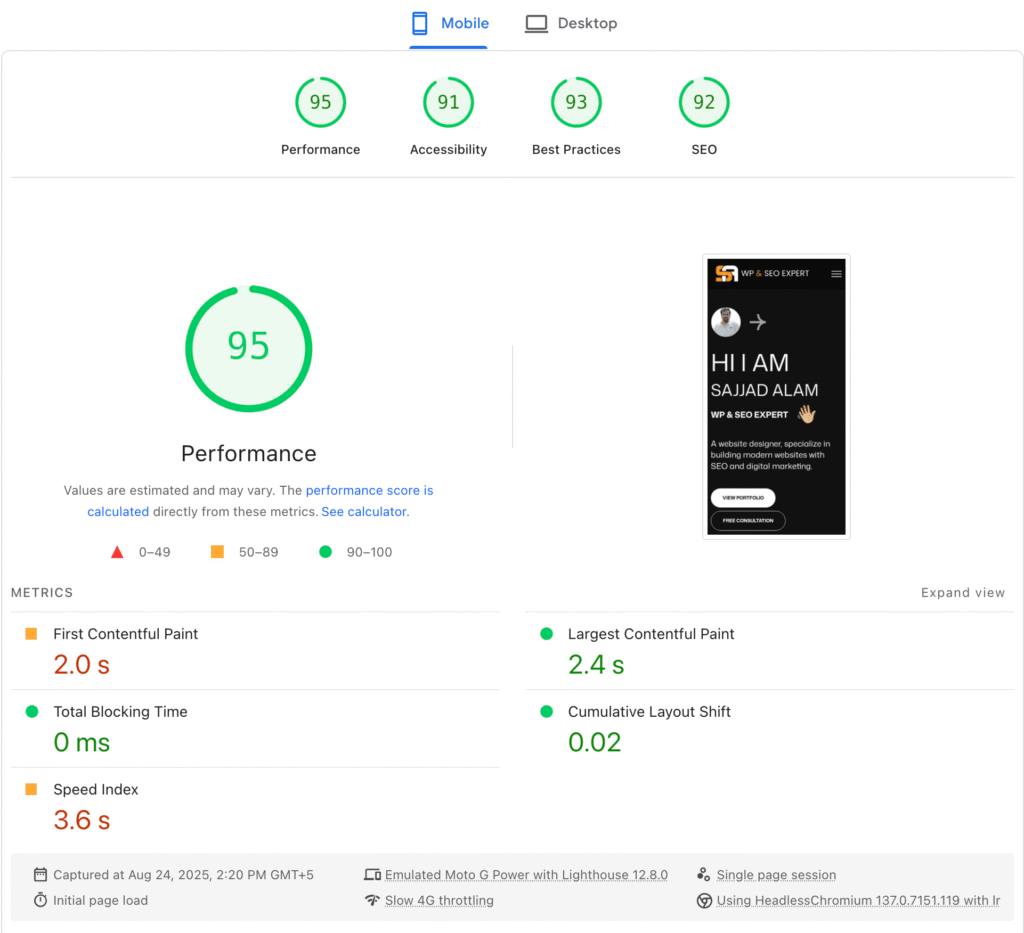
Website: www.sajjadalam.dev
Goal: Prove that WordPress + smart optimization = world-class performance
Steps I took:
- Migrated my site to Hostinger Business and enabled CDN
- Installed WP Rocket → caching, lazy-load, file optimization
- Added Imagify → compressed all images, converted to WebP
The results (measured on Google Lighthouse – Mobile):
- Performance: 95
- Accessibility: 91
- Best Practices: 93
- SEO: 92
Key metrics:
- First Contentful Paint (FCP): 2.0s
- Largest Contentful Paint (LCP): 2.4s
- Cumulative Layout Shift (CLS): 0.02
- Total Blocking Time (TBT): 0 ms
📈 With just these tools, my portfolio site achieved 95+ performance on mobile — which is harder than desktop.
Other References (Proof This Works Everywhere)
- Kinsta.com tested caching plugins and ranked WP Rocket as one of the best for real-world speed boosts.
- ThemeIsle.com reported a 50% improvement in page load times after enabling WP Rocket.
- WP Beginner recommends Imagify as one of the easiest image compression plugins that integrates seamlessly with WordPress.
- TechRadar (2025) rated Hostinger as one of the fastest, most reliable hosting providers for WordPress websites.
- Popular blogs & e-commerce stores using this combo have consistently improved their Core Web Vitals, helping with both SEO rankings and conversion rates.
Who Should Use This Setup?
- Freelancers & developers: Show clients their site can be fast without heavy coding
- Small business owners: Easy-to-manage setup, no technical headaches
- Bloggers & creatives: Keep image-heavy sites light and SEO-friendly
Beginner Glossary
- Caching: Saves ready-made copies of pages so they load faster
- CDN: Serves your site from the nearest server worldwide
- WebP: Modern image format that’s smaller than JPEG/PNG
- Core Web Vitals: Google’s key speed & stability metrics (FCP, LCP, CLS)
Final Verdict
The winning formula for WordPress optimization is:
- Hostinger Business Hosting (fast LiteSpeed + CDN)
- WP Rocket (caching, lazy-load, file minification)
- Imagify (image compression + WebP)
This setup is beginner-friendly, affordable, and proven to work — I’ve done it myself, and it’s backed by references from Kinsta, ThemeIsle, WP Beginner, and TechRadar.
If my own site can hit 95+ on mobile Lighthouse, your site can too.
Pingback: Where to Find Best Theme for WordPress Website in 2025